
Download TeachTown® Basics – Educational Software for Autism & Language Development
Overview
TeachTown® Basics is a specialized desktop software designed to support the educational and therapeutic needs of children with developmental challenges, particularly those on the autism spectrum. Targeted at learners between the ages of 2 and 12, the program integrates structured computer-based lessons with practical off-computer activities to promote language acquisition, communication abilities, and emotional regulation. The software is intended for use in both home and classroom settings by educators, therapists, and caregivers who work with special needs populations.
Developed by TeachTown, the application focuses on evidence-based teaching strategies tailored to individual learning paces. It supports early intervention by delivering engaging, interactive content that aligns with developmental milestones. Real-world usage includes daily instruction sessions, progress tracking, and the facilitation of skill generalization across environments.
The developer did not provide additional system requirements, and exact performance details were not specified. However, the software is designed to be accessible and intuitive for both users and learners with diverse needs.
Key Features & Capabilities
- Interactive Computer Lessons: Engaging digital modules that guide children through foundational language and communication tasks using visual and auditory cues.
- Off-Computer Generalization Activities: Designed to reinforce skills learned in digital lessons through real-life practice, such as role-playing or object identification in daily routines.
- Personalized Learning Paths: Adapts content delivery based on individual progress, allowing for customized instruction for each student.
- Progress Tracking Tools: Enables educators and caregivers to monitor skill development over time and adjust teaching strategies accordingly.
- Curriculum-Aligned Content: Structured around developmental goals in language, social interaction, and emotional awareness, suitable for use in special education programs.
These features are particularly effective in structured learning environments where consistent, repeatable instruction is essential. For example, a speech therapist may use the computer lessons to introduce vocabulary, then follow up with hands-on activities to encourage real-world application. The program’s design supports both direct instruction and incidental teaching, making it adaptable to various teaching styles and student needs.
User Interface, Workflow & Performance
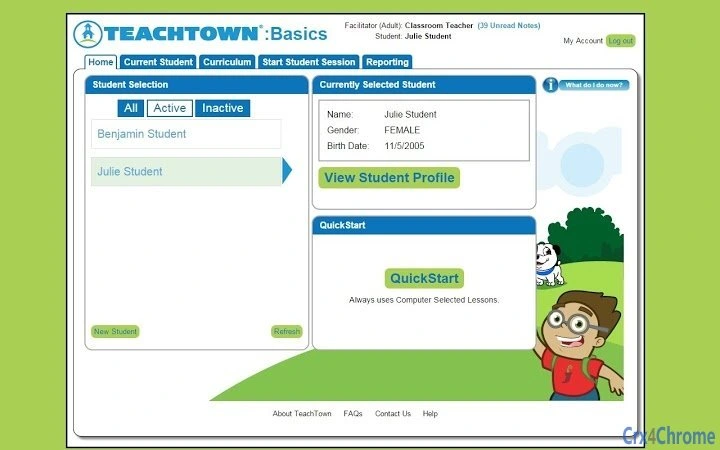
The user interface of TeachTown® Basics is designed with accessibility in mind, featuring large icons, clear navigation, and minimal text to reduce cognitive load. The workflow follows a logical sequence: users select a lesson, complete interactive tasks, and then transition to related off-computer activities. Navigation is straightforward, with consistent layout across modules, which helps maintain focus for young learners.
The software supports both mouse and touch input, making it usable on a variety of devices. The developer did not specify resource usage details, and performance observations are based on general software behavior patterns. Stability during extended use has not been independently verified.
However, the program’s modular design suggests it is built to handle repeated sessions without significant lag. No reports of crashes or freezes were included in the provided information. The software is expected to function reliably in standard classroom or home environments.
Compatibility & System Requirements
TeachTown® Basics is compatible with both Windows and Mac operating systems, making it accessible to a broad range of users across different educational institutions and home setups. The software has a file size of 450MB, indicating a moderate installation footprint. The developer did not provide detailed hardware requirements, such as minimum RAM, processor speed, or storage space.
Exact system requirements were not listed. Compatibility information was partially provided, with support confirmed for Windows and Mac platforms. Users are advised to ensure their devices meet standard desktop software requirements for smooth operation.
No information was provided about support for older OS versions or specific device types.
Pros and Cons
Pros
- Specifically designed for children with autism and special needs
- Combines digital learning with real-world application
- Free to download and use, reducing accessibility barriers
- Supports individualized instruction through adaptive learning paths
- Offers tools for tracking student progress over time
Cons
- No detailed system requirements provided
- Performance and resource usage data not specified
- Limited information on update frequency or future development
- Only available for Windows and Mac, no mobile or web-based access
- Targeted audience may limit broader appeal
FAQ Section
Is TeachTown® Basics compatible with all versions of Windows and Mac?
Compatibility is confirmed for Windows and Mac operating systems, but the specific versions supported were not listed by the developer.
Is the software safe to use for children with autism?
TeachTown® Basics is designed with safety and accessibility in mind for children with special needs, including those on the autism spectrum. The content is structured to minimize sensory overload and support emotional regulation.
Does the software require an internet connection?
The software operates as a desktop application and does not require a constant internet connection. However, some features may benefit from occasional updates or cloud-based progress syncing, though this was not specified.
Can I use TeachTown® Basics offline?
Yes, the program is designed to function offline after installation, allowing for uninterrupted use in classrooms or homes without reliable internet access.
Is there a license or subscription required to use the software?
TeachTown® Basics is available at no cost. The developer did not specify whether the software is permanently free or subject to future licensing changes.
Final Thoughts + CTA
TeachTown® Basics stands out as a thoughtful, purpose-built solution for educators and caregivers supporting children with autism and developmental delays. Its dual approach—combining digital instruction with real-life skill practice—offers a comprehensive framework for language, communication, and emotional growth. While system requirements and performance data are limited, the software’s design prioritizes usability and accessibility.
It is especially valuable for special education programs seeking a structured, free tool to supplement existing curricula. The absence of cost lowers the barrier to entry, making it a strong candidate for schools, therapists, and families. For those working with children aged 2 to 12 who need targeted developmental support, TeachTown® Basics delivers meaningful value.
Download TeachTown® Basics now.







